

About Walter Sisulu
Get in touch
Email Address:
Contact Numbers:
Mthatha: 047 502 2100
Butterworth: 047 401 6000
East London: 043 702 9200
Potsdam: 043 708 5200
Chiselhurst: 043 709 4000

Dear Student,
Welcome to the 2026 academic year at iYunivesithi Walter Sisulu.
Effective application and registration processes are the foundation of a positive student experience. The first point of contact with the University remains critical for a prospective student as you try to learn more about the University, your academic department, faculty, and general administrative support offices. Following proper procedures in whatever you do during registration will get you to the point of your first day in the University classroom. Walter Sisuly is prepared to accompany you on your life- changing academic journey.
How to Register –
2025 ONLINE REGISTRATION DATES:
You will not be able to register if your status reflects other statuses such as:
You will only be able to register for a programme with an admission status
You will not be able to register if you have any other active restrictions, such as
You can track your application status by using the tracking system on the WSU website link: https://status.wsu.ac.za/status/statuscheck.php
Student Portal (iEnabler) Login, and Pin
Access the iYunivesithi Walter Sisulu Online registration portal using this direct link: https://ienabler.wsu.ac.za/pls/prodi41/w99pkg.mi_login.
Enter your Student number and login Pin
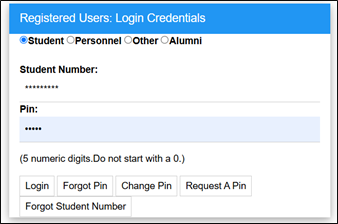
Click on “Login” if you know your pin, or if not, click on “Request a PIN”. Your PIN will be directed to your Email Address that you have registered on the system.
Access your forgotten PIN by entering your details using WSU Pin recovery facility, Link: https://status.wsu.ac.za/reset/index.php.
Enter your Student Number, ID or Passport Number, and Full Name. If you entered the information correctly, your PIN will be displayed on the page.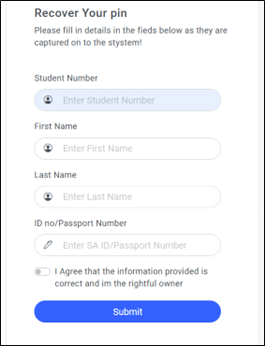
Registration is an online process and is conducted off-campus.
If you have trouble registering online (While off campus), please refer to the below contact information for assistance.
NOTE:
Once you have completed your registration, it is very important that you check the following on your Proof of Registration printout:
If you fail to make corrections before the amendment cut-off dates, you will be liable for the fees, and the subjects concerned will appear on your academic record as a FAIL.
Step by Step Online Registration Guide
Forgot your PIN?
Rules and Regulations:
Possible Subject Selection:
On the next screen:
Print Registration Details or Print Cost Details:
Select Proof of Registration from the left to print your proof.
The Proof of Registration should include:
Save the proof of registration document.
Congratulations, you have registered successfully.
Email Address:
Contact Numbers:
Mthatha: 047 502 2100
Butterworth: 047 401 6000
East London: 043 702 9200
Potsdam: 043 708 5200
Chiselhurst: 043 709 4000