

About Walter Sisulu
Get in touch
Email Address:
Contact Numbers:
Mthatha: 047 502 2100
Butterworth: 047 401 6000
East London: 043 702 9200
Potsdam: 043 708 5200
Chiselhurst: 043 709 4000

Welcome to the 2026 academic year.
Effective application and registration processes are the foundation of a positive student experience. The first point of contact with the University remains critical for a prospective student as you try to learn more about the University, your academic department, faculty, and general administrative support offices. Following proper procedures in whatever you do during registration will get you to the point of your first day in the University classroom. iYunivesithi Walter Sisulu is prepared to accompany you on your life- changing academic journey.
2026 Registration Dates
Returning Students and New students with firm Admissions – 07 January 2026
First year students (First time Entering students) – 15 January 2026
2026 Registration Dates
2026 Registration Ends
Masters and PhD’s Registration Ends – 23 January 2026
Registration Ends for ALL students – 30 January 2026
2026 Amendments Dates
Amendments to Registration Records (Subject Cancellations / Subject Additions)
Start, 02 February 2026
End 02 March 2026
2026 Amendments Dates
Registration is an online process and is conducted off-campus.
If you have trouble registering online (While off campus), please refer to the below contact information for assistance.
NOTE:
Once you have completed your registration, it is very important that you check the following on your Proof of Registration printout:
- The Registered for Period (usually the whole year)
- The Course, Offering Type (i.e. Full-time or part-time) and Campus
- The Subject Code and When the subject is offered (Semester 1, 2, or year)
- The Exam Year and Month
- The spelling of your Name/s and Surname.
If you fail to make corrections before the amendment cut-off dates, you will be liable for the fees, and the subjects concerned will appear on your academic record as a FAIL.
Step 1: Access the WSU Online Registration Portal
Go to the iYunivesithi Walter Sisulu website and click on the Student Portal link, or use the direct link:
Access the Walter Sisulu Online registration portal.
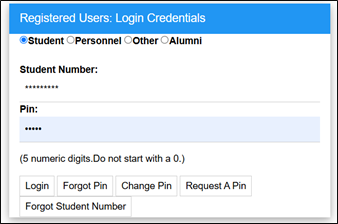
Step 2: Login and PIN Retrieval
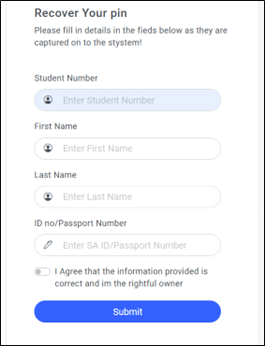
Forgot your PIN?
Step 3: Academic Registration
Rules and Regulations:
- Select Rules and Regulations and read through the document.
- Click on the I Accept button at the bottom (you may need to scroll down to see it).
- Acceptance of the Rules and Regulations is compulsory and serves as your electronic signature, stored in your student file.
Step 4: Submit Registration and Select Subjects
Possible Subject Selection:
On the next screen:
Print Registration Details or Print Cost Details:
Accept Registration
Step 5: Proof of Registration
Step 6: Issuing of Student Cards